Introduction
In this tip, I am going to explain about types of join.What is join??
An SQLJOIN clause is used to combine rows from two or more tables, based on a common field between them. There are many types of
join. - Inner Join
- Equi-join
- Natural Join
- Outer Join
- Left outer Join
- Right outer join
- Full outer join
- Cross Join
- Self Join
Using the Code
Join is very useful to fetching records from multiple tables with reference to common column between them.To understand
join with example, we have to create two tables in SQL Server database. EmployeeHide Copy Codecreate table Employee( id int identity(1,1) primary key, Username varchar(50), FirstName varchar(50), LastName varchar(50), DepartID int )
Departments
Hide Copy Code
create table Departments(

id int identity(1,1) primary key,
DepartmentName varchar(50)

)
Employee table with demo records like that.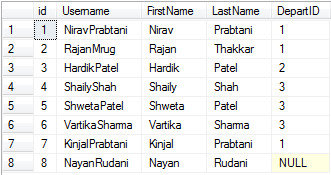
Fill
Department table also like this....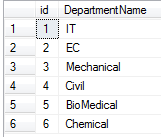
1) Inner Join
The join that displays only the rows that have a match in both the joined tables is known as inner join.
Hide Copy Code
select e1.Username,e1.FirstName,e1.LastName,e2.DepartmentName _
from Employee e1 inner join Departments e2 on e1.DepartID=e2.id
It gives matched rows from both tables with reference to DepartID of first table and id of second table like this. 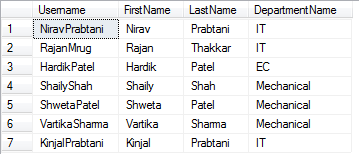
Equi-Join
Equi join is a special type ofjoin in which we use only equality operator. Hence, when you make a query for join using equality operator, then that join query comes under Equi join. Equi join has only (=) operator in
join condition.Equi join can be inner join, left outer join, right outer join.
Check the query for equi-join:
Hide Copy Code
SELECT * FROM Employee e1 JOIN Departments e2 ON e1.DepartID = e2.id
2) Outer Join
Outer join returns all the rows of both tables whether it has matched or not.We have three types of outer join:
- Left outer join
- Right outer join
- Full outer join
a) Left Outer join
Left join displays all the rows from first table and matched rows from second table like that..
Hide Copy Code
 SELECT * FROM Employee e1 LEFT OUTER JOIN Departments e2
ON e1.DepartID = e2.id
Result: 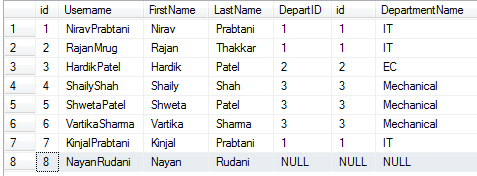
b) Right outer join
Right outer join displays all the rows of second table and matched rows from first table like that.
Hide Copy Code
 SELECT * FROM Employee e1 RIGHT OUTER JOIN Departments e2
ON e1.DepartID = e2.id
Result: 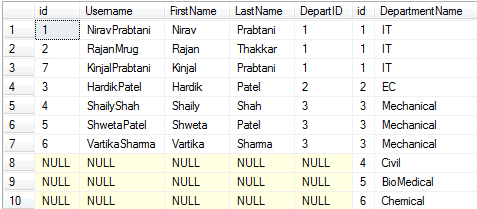
3) Full outer join
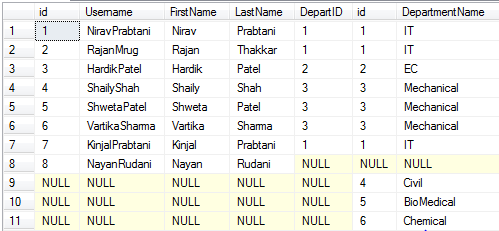
Full outer join returns all the rows from both tables whether it has been matched or not.
Hide Copy Code
 SELECT * FROM Employee e1 FULL OUTER JOIN Departments e2
ON e1.DepartID = e2.id
Result:
3) Cross Join
A cross join that produces Cartesian product of the tables that are involved in the join. The size of a Cartesian product is the number of the rows in the first table multiplied by the number of rows in the second table like this.
Hide Copy Code
SELECT * FROM Employee cross join Departments e2
You can write a query like this also:
Hide Copy Code
SELECT * FROM Employee , Departments e2
4) Self Join
Joining the table itself called self join. Self join is used to retrieve the records having some relation or similarity with other records in the same table. Here, we need to use aliases for the same table to set a self join between single table and retrieve records satisfying the condition inwhere clause.
Hide Copy Code
SELECT e1.Username,e1.FirstName,e1.LastName from Employee e1 _
inner join Employee e2 on e1.id=e2.DepartID
Here, I have retrieved data in which id and DepartID of employee table has been matched: 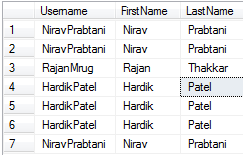
Points of Interest
Here, I have taken one example of self join in this scenario where manager name can be retrieved bymanagerid with reference of employee id from one table. Here, I have created one table
employees like that: 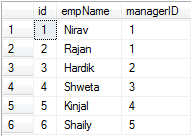
If I have to retrieve manager name from manager id, then it can be possible by Self join:
Hide Copy Code
select e1.empName as ManagerName,e2.empName as EmpName _
from employees e1 inner join employees e2 on e1.id=e2.managerid
Result: 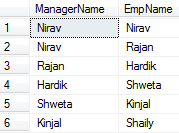

No comments:
Post a Comment