Dynamic PIVOT in Sql Server
In the Previous Post PIVOT and UNPIVOT in Sql Server
explained how PIVOT relational operator can be used to transform
columns distinct values as Columns in the result set by mentioning all
the distinct column values in the PIVOT operators PIVOT columns IN
clause. This type of PIVOT query is called Static PIVOT query, because
if the PIVOT column in the source table get’s extra unique values after
the initial query then that will not reflect in the PIVOT query result
unless it is mentioned in the PIVOT Columns IN clause. Static PIVOT
queries are fine as long as we know that the PIVOT column values never
change, for instance if PIVOT column values are MONTH or Day of the Week
or hour of the day etc.
In this Article will present how we can
write a Dynamic PIVOT query with an example, where we don’t need to
mention the PIVOT columns each unique values and no need to worry if
PIVOT column gets extra unique values after the initial query.
ALSO READ: PIVOT and UNPIVOT in Sql Server
First Create a Temporary Table #CourseSales with sample records as depicted in the below image by using the following script:
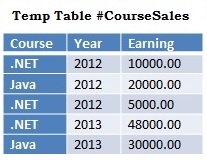
--Create Temporary Table #CourseSalesCREATE TABLE #CourseSales(Course VARCHAR(50),Year INT,Earning MONEY)GO--Populate Sample recordsINSERT INTO #CourseSales VALUES('.NET',2012,10000)INSERT INTO #CourseSales VALUES('Java',2012,20000)INSERT INTO #CourseSales VALUES('.NET',2012,5000)INSERT INTO #CourseSales VALUES('.NET',2013,48000)INSERT INTO #CourseSales VALUES('Java',2013,30000)GO |
PIVOT #CourseSales Table data on the Course column Values
Let us first understand the Static PIVOT query and then see how we can modify this Static PIVOT query to Dynamic.
Static PIVOT query
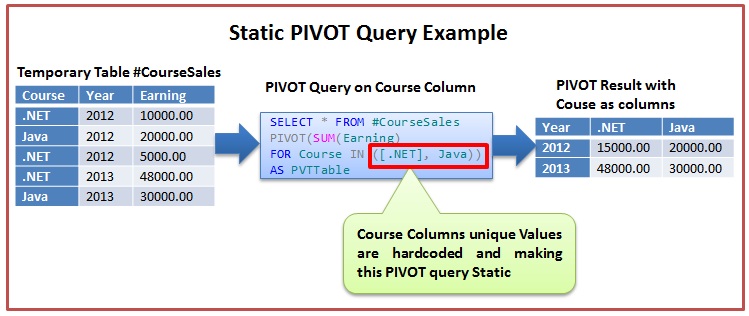
Below Static PIVOT script pivots the
#CourseSales Table data so that the Course columns distinct values are
transformed as Columns in the result set as depicted in the above image.
SELECT *FROM #CourseSalesPIVOT(SUM(Earning) FOR Course IN ([.NET], Java)) AS PVTTable |
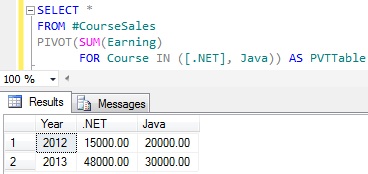
Let us insert one more row in the #CourseSales table for the new course SQL Server with below insert statement.
INSERT INTO #CourseSales VALUES('Sql Server',2013,15000) |
RESULT:
From the above result it is clear that the newly added course Sql Server sales data is not reflected in the result.
Dynamic PIVOT Query
To make the above Static PIVOT query to
dynamic, basically we have to remove the hardcoded PIVOT column names
specified in the PIVOT operators PIVOT columns IN clause. Below query
demonstrates this.
DECLARE @DynamicPivotQuery AS NVARCHAR(MAX)DECLARE @ColumnName AS NVARCHAR(MAX)--Get distinct values of the PIVOT Column SELECT @ColumnName= ISNULL(@ColumnName + ',','') + QUOTENAME(Course)FROM (SELECT DISTINCT Course FROM #CourseSales) AS Courses--Prepare the PIVOT query using the dynamic SET @DynamicPivotQuery = N'SELECT Year, ' + @ColumnName + ' FROM #CourseSales PIVOT(SUM(Earning) FOR Course IN (' + @ColumnName + ')) AS PVTTable'--Execute the Dynamic Pivot QueryEXEC sp_executesql @DynamicPivotQuery |
RESULT:
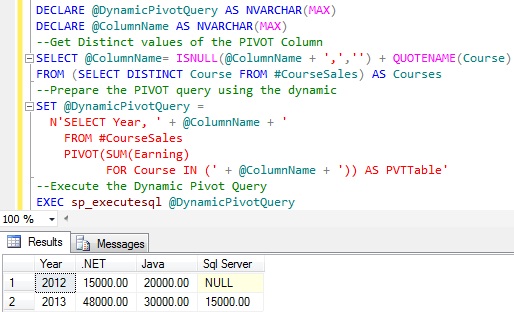
From the above result it is clear that
this query is a True Dynamic PIVOT query as it reflected all the courses
in the #CourseSales table without needing to write hardcoded course
names in the PIVOT query.

No comments:
Post a Comment